
Rearview Download
Rearview 1.0 is out ›

Portfolio backtesting you can trust.

Rearview is a native Mac app that tests your trading rules across a whole portfolio: stocks and ETFs, coins, futures and forex, on daily bars or down to the minute. No Windows virtual machine, no look-ahead bias, and every search tells you plainly when a result is probably luck.

30 days free, no card · Buy once, no subscription · Apple silicon, macOS 26 or later

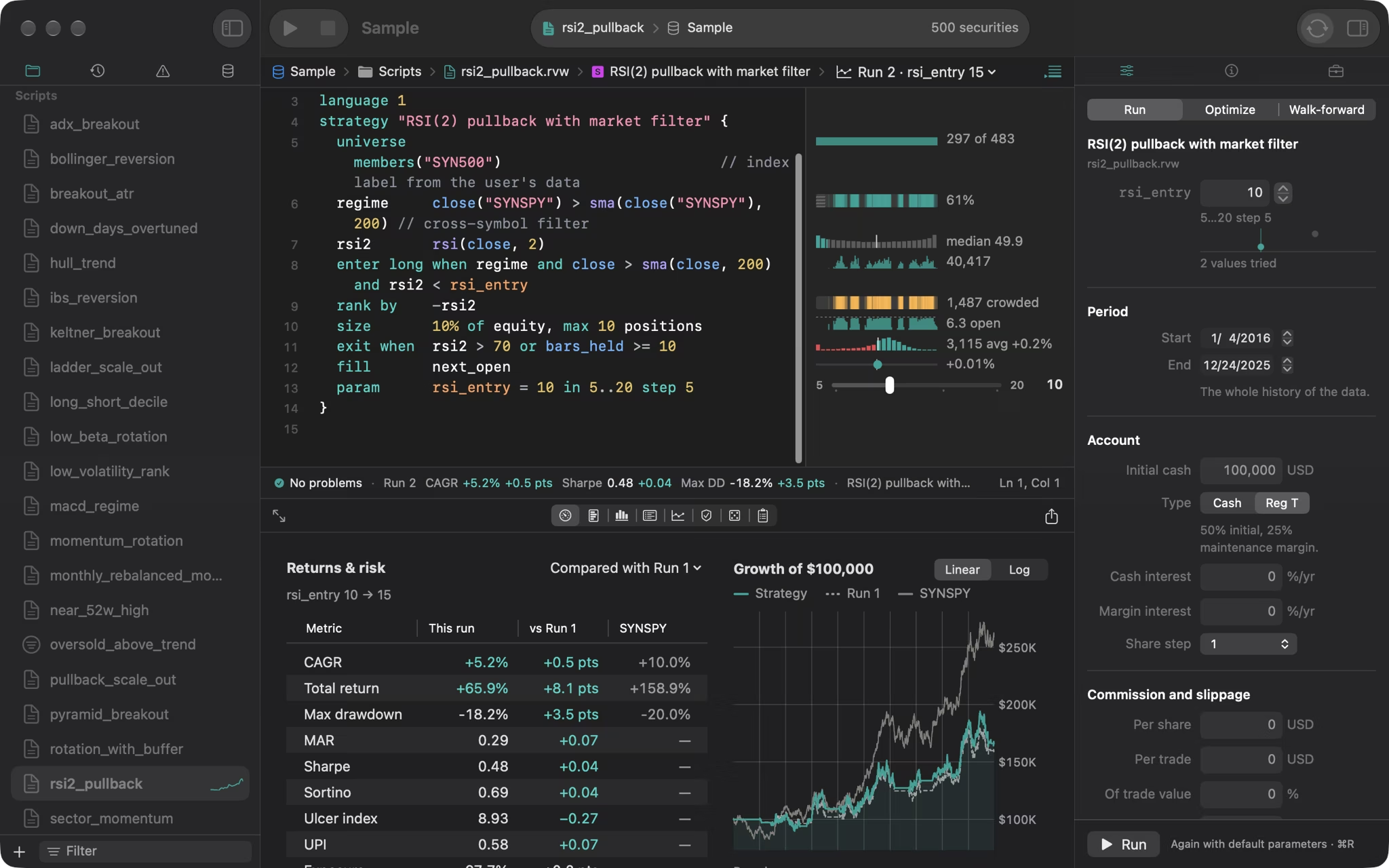
Rearview’s window: a strategy script with each line’s figures beside it, the run settings, and the run’s results below

Every screenshot shows the synthetic sample data that comes with the app.

Results you can trust

It can’t see tomorrow.

On each day a strategy sees only what was known at that day’s close. Before every release the whole pipeline is replayed on data cut off at thousands of dates, and every decision has to come out the same.

The same answer every run.

Cash and shares are counted exactly, and parallel work adds up in a fixed order, so a result is identical on one core or eighteen. Every saved run reruns from its own folder.

Checked against a second engine.

A separate engine, written from the engine’s rules and hand-worked cases without seeing its code, has to match every trade and every cent. Three open-source backtesters, vectorbt, bt and QuantConnect’s LEAN, agree on the cases they can model.

Checked for 1.0.2 on 18 November 2026: replayed at 10,924 cut dates with no differences, 2,200 random scenarios against the second engine with 0 differences, 220 of 220 scenarios alike in vectorbt, bt and LEAN, and 104 of 104 golden replays byte for byte.

Read How Rearview is checked ›

5,000 stocks · 10 yrs

0.15s

Warm portfolio run

0.50 s cold, exact integer accounting.

17.8M 5-min bars

0.79s

Two years intraday

500 stocks with VWAP, cold from disk.

1,000 grid trials

12.7s

Full luck search

500 stocks × 10 yrs, with DSR, PBO and Reality Check.

5,000 stocks

0.46s

Evening market scan

Ranked with every indicator written to CSV.

Native Rust on Apple silicon · Measured for 1.0.2 on Apple M5 Max. Every speed budget ›

Inside Rearview.

One window for the script, its results, every trade, your scans, your live account and every run you’ve kept.

The editor: a strategy script with each line’s figures beside it, the run settings, and the run’s results below

Every line shows what it actually did.

A strategy is one short plain-text file in a regular folder, so it works with git and any editor. Beside every line, inline figures and mini charts show how many stocks matched, how often a regime held, how many days crowded the slots, and what each exit returned. With Run Automatically on, ⌥-dragging a number tweaks and reruns it in place. The language › 42 examples ›

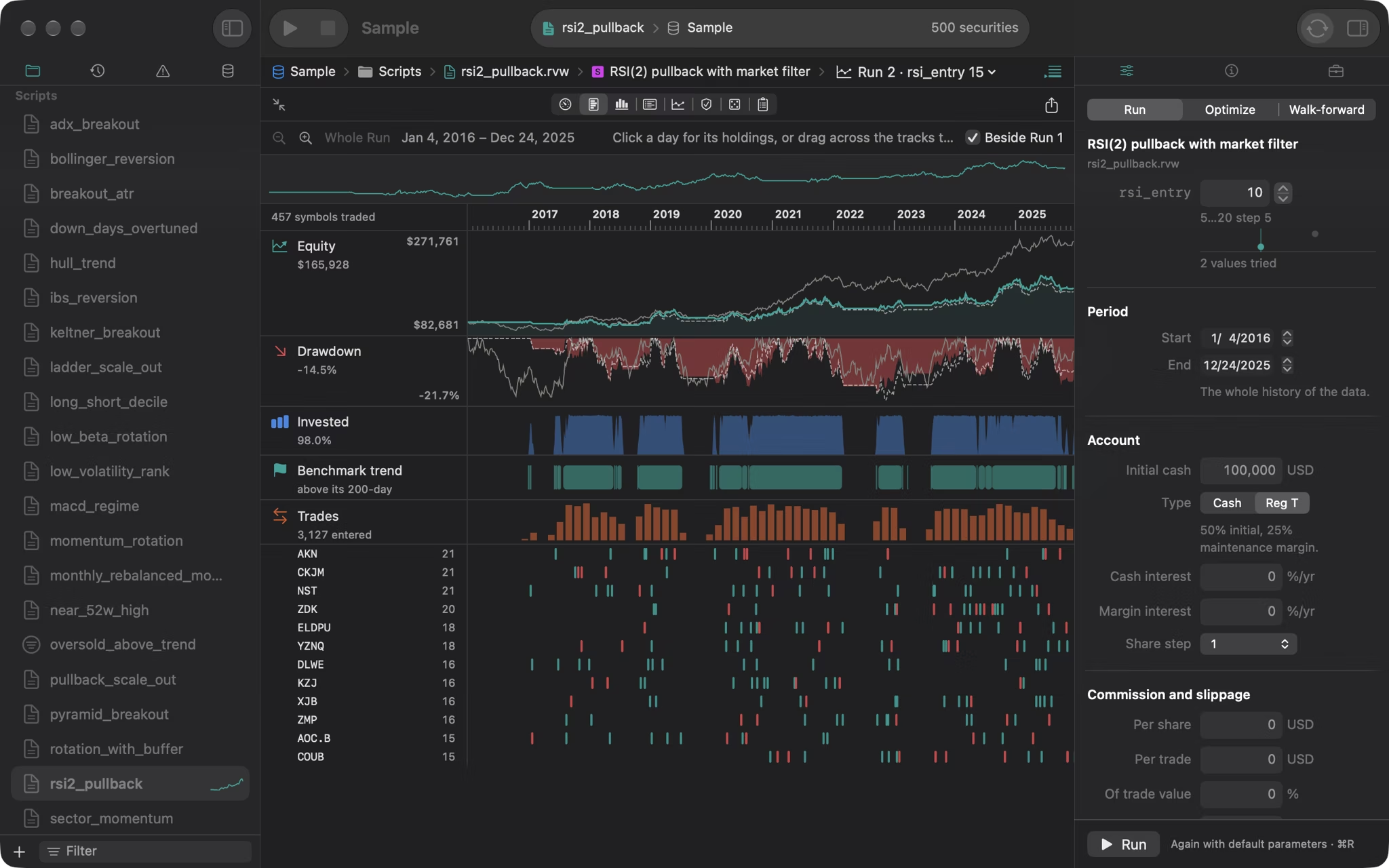
The Timeline tab: equity, drawdown, the share invested, the benchmark’s trend and every trade on one clock

Real portfolio testing.

Rank and trade across hundreds of stocks a day, with position limits, rebalancing and a buffer that keeps holdings while they still rank. Run two to eight strategies in sleeves or one pool of cash. Long and short, with borrow fees and margin. The Timeline puts equity, drawdown, exposure, the benchmark’s trend and every trade on one clock. Results ›

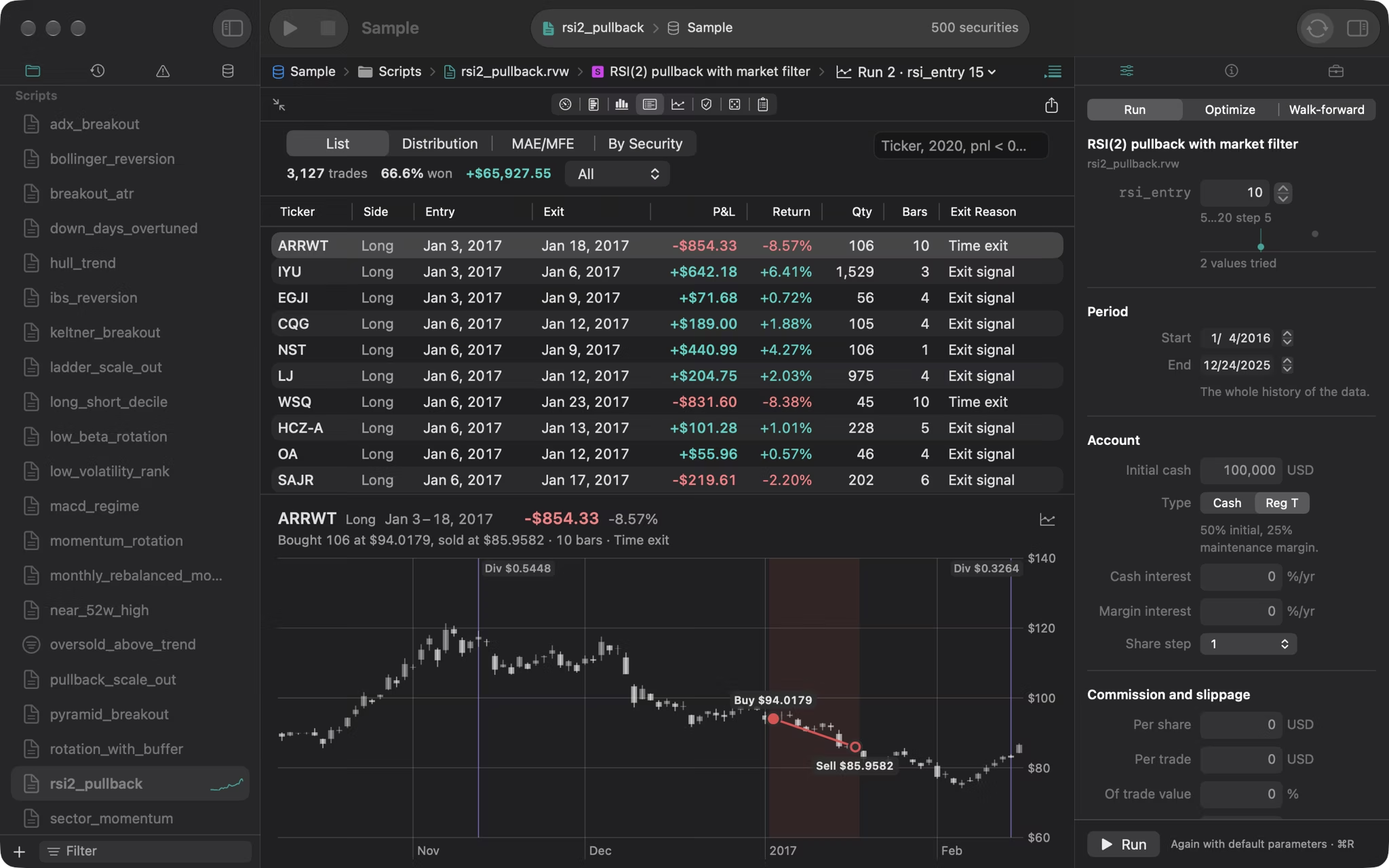
The Trades tab: the trade list under a histogram of returns, the selected trade on its chart with the buy and the sell marked, and the Trade inspector saying why it entered and exited

Every trade, up close.

Step through a run’s trades with the arrow keys, each on its own chart with the entry and exit marked, and see why each one entered and exited, condition by condition. See them by exit reason, as a distribution, or by how far each went against you first, and where the money came from by security and sector. Export a run as a self-contained HTML report.

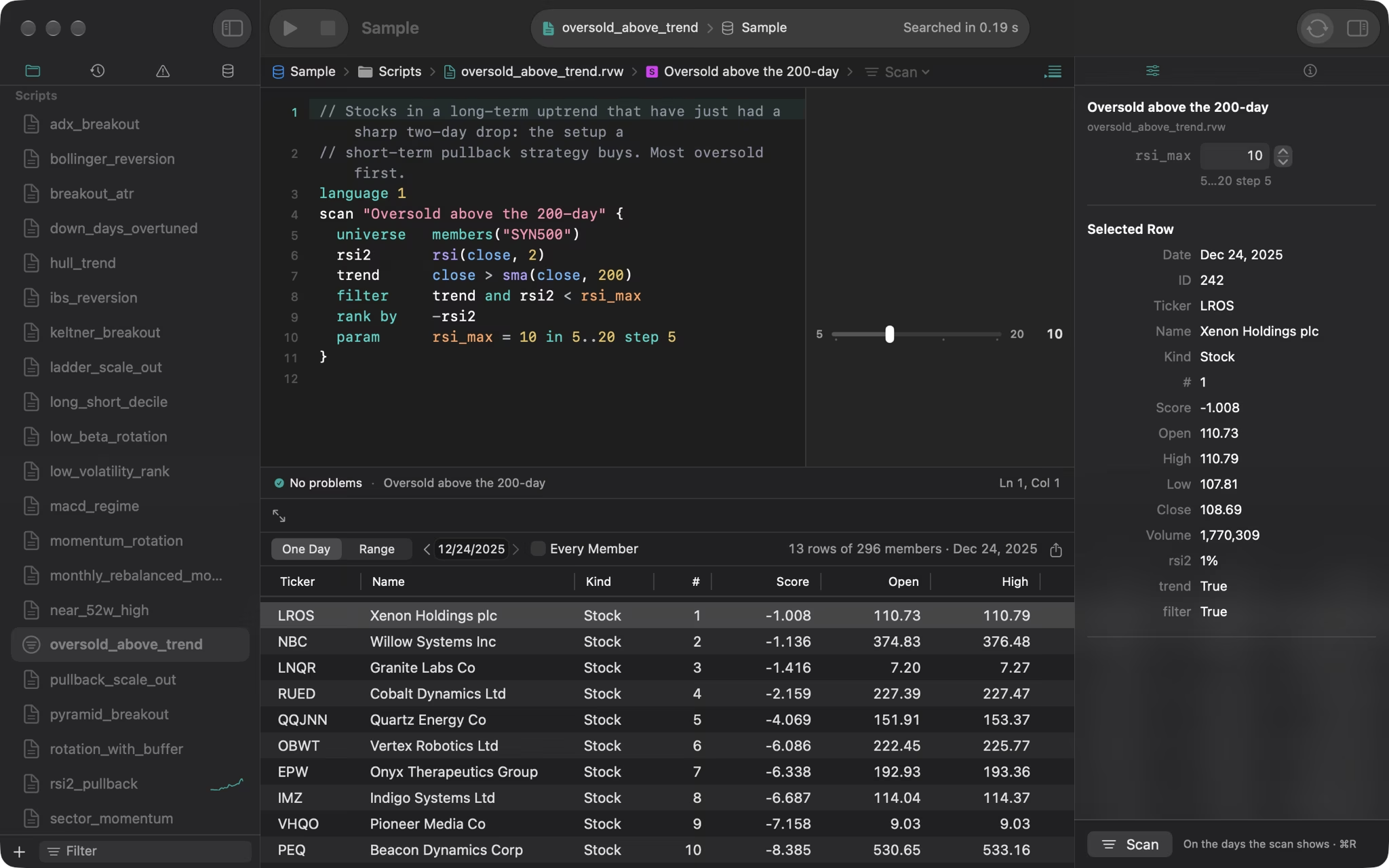
A scan of the sample data’s last day: stocks above their 200-day average after a sharp two-day drop, most oversold first

Scan the market every evening.

A short script lists the securities that meet your conditions on a day, with every value it worked out, best ranked first. Step a day back, scan a range of days, and export the rows as CSV. How scans work ›

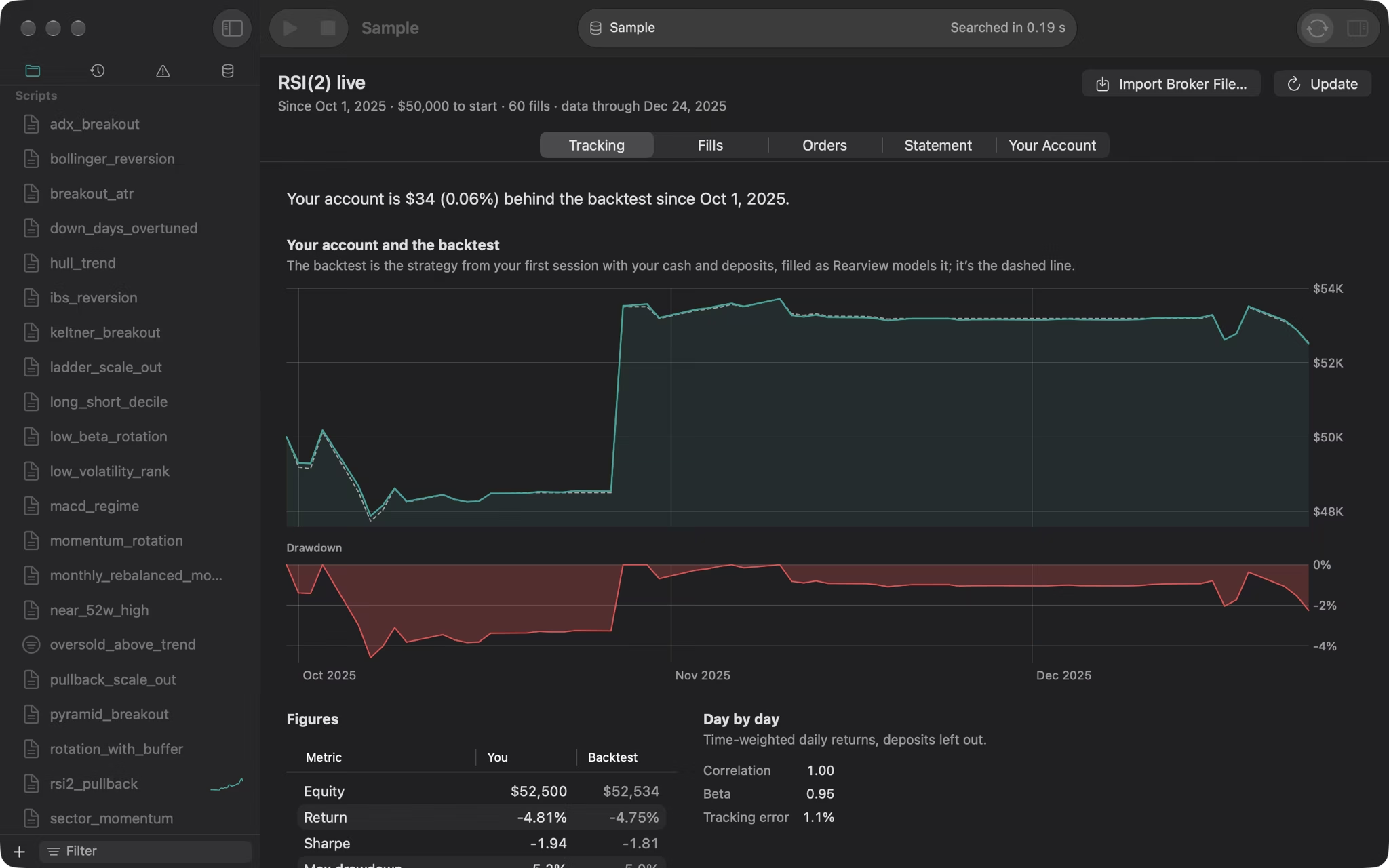
A live account’s Tracking tab: the next session’s orders, then your equity beside the backtest’s dashed line and its drawdown, from a broker file made up for the picture

From research to your evening routine.

Import an Interactive Brokers Flex file, or any broker’s fills as CSV. Rearview replays your real trades beside the backtest of the same days to separate slippage from missed orders, then writes the next session’s orders sized from your real account, on a schedule if you like. It never places an order. The account pictured comes from a broker file made up for it. Live accounts ›

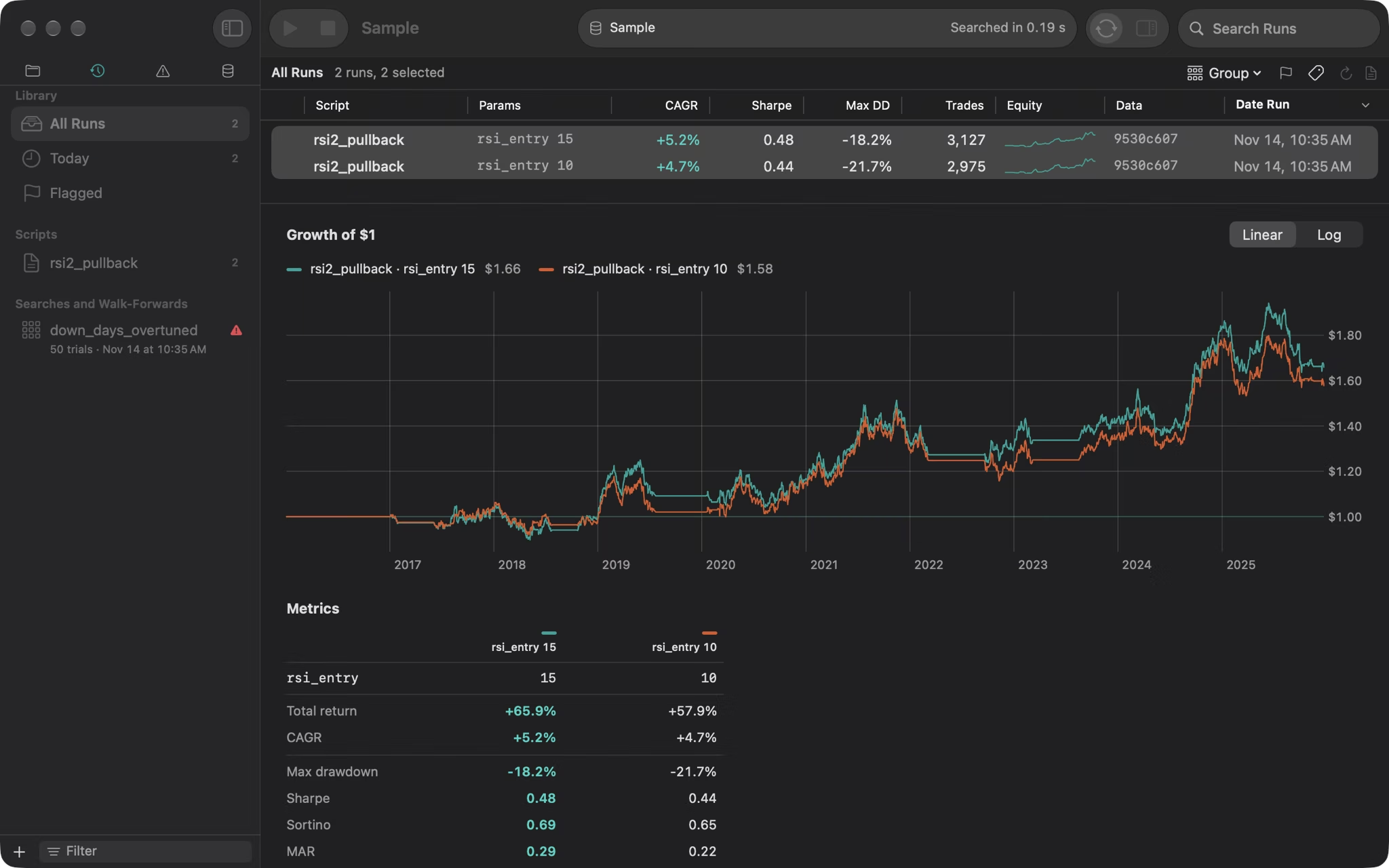
The Runs library comparing two runs: their growth of one dollar and their figures side by side

Every run kept. Every run reproduces.

Each run is saved with its script, settings, engine version and a fingerprint of its data. The Runs library sorts, flags, tags and searches them, and compares any two side by side, with a warning when they aren’t like for like.

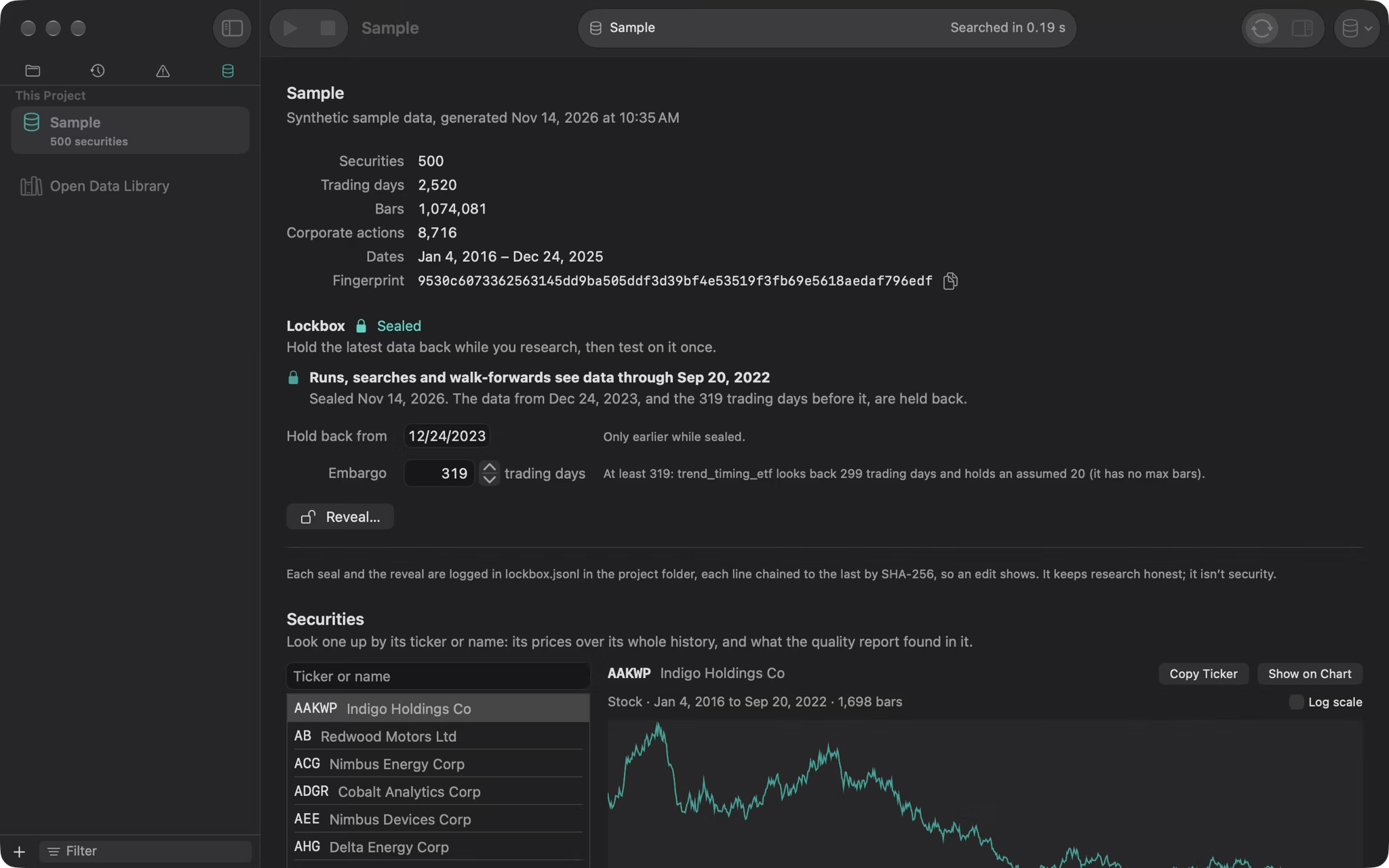
The data view: what the sample data holds, its sealed lockbox as a bar of the days research sees, the embargo and the days held back, and its securities in a table with what the quality report noted

Your data, done right.

Bring the data you already pay for, or start with free exports. Rearview converts per-symbol files, futures contracts and Sharadar’s tables, and an export script brings in Norgate Data. It works out adjusted prices itself, finds gaps, price jumps and missing splits, and keeps earlier runs reproducing when the data updates. Importing ›

Is this result luck?

Search a strategy’s settings and Rearview counts every variation you tried, earlier runs and previews included. It reports the Deflated Sharpe Ratio and the Probability of Backtest Overfitting with every input shown, then says it plainly: probably not luck, can’t tell, or probably luck.

A search’s verdict: Probably luck, 1 of 3 checks passed, in a table of its checks over its Deflated Sharpe of 97% and PBO of 82% marked on a map of the zones, beside a heatmap of every setting

Deflated Sharpe, 97%. The rule family seems to earn something, even after counting all 50 settings tried.

PBO, 82%. The setting that looked best in one half of the history ranked below the median in the other half 82% of the time.

Probably luck. Which setting is best is noise, and that is the part you would pick. The verdict lists every input.

Set any run against 500 runs that enter at random at its own rate. Stress-test it with costs doubled and signals a day late. Hold the latest years back in a lockbox, and walk it forward: pick settings on the past and trade them on what came next. Research ›   Try the Deflated Sharpe calculator ›

Use an AI coding agent without letting it fool you.

An AI agent can test hundreds of variations of a script in an afternoon. Without trial accounting, it will quietly hand you the luckiest overfit in the bunch.

Rearview’s scripts are plain text in a git-friendly folder, the entire language reference fits on one page (also saved via File ▸ Save Language Reference to Project), and rvw check --json lets Claude Code, Codex or any coding agent check its own syntax. Every run it makes with rvw run --project is logged right beside yours in the project’s tries log, so if it tries 200 variations of a script, Rearview deflates the Sharpe for all 200 and tells you.

How every try is counted ›

Terminal · rvwsame engine as the Mac app
$ rvw check pullback.rvw --json
{"ok": true, "diagnostics": [], "kind": "strategy", ...}

$ rvw run --project . --script pullback.rvw
{"out": "runs/20261120-140209-pullback-0a3f", "tries": {...}, ...}

$ rvw analyze --run runs/20261120-140209-pullback-0a3f \
    --tries tries.jsonl --as pullback.rvw --data Sample
{"tries": {"tries": 184, "dsr": {"dsr": 0.41, ...}, "verdict": "Probably luck"}, ...}

Stocks, coins, futures and forex.

Each market trades on its own days under the engine’s written rules, and the second engine checks them all.

Exchanges around the world

Hold US stocks beside London’s or Sydney’s, each on its own exchange’s days. Exchanges ›

Your account’s currency

Dollars, pounds, euros or any currency your data has a forex pair for, at the day’s rate. Currencies ›

Coins

Every day of the week, in fractions down to a hundred-millionth, long only. Coins ›

Futures

Chains that roll from one contract to the next and settle at every close. Futures ›

Forex

Pairs that settle daily and earn or pay carry from both currencies’ rates. Forex ›

Bars down to a minute

Intraday stocks and ETFs, the time of day, and flat at the close, half days included. Intraday ›

Buy it once. Keep it.

No subscription, no data markup, and no Windows licence or virtual machine to buy alongside it. Your licence is checked on your Mac, the version you buy keeps working, and if Rearview is ever discontinued, a final version ships with the licence check removed.

Trial

Free

30 days from your first backtest, scan or check. No card.

Licence

$349

Once, with every update released in the next 12 months.

Black Friday price

$199

From 20 to 30 November.

Update renewal

$149

A year, if you want it. The app keeps working without it.

Still in your 30-day trial? Buying at $199 locks in the Black Friday price, and every purchase includes a full 30-day, no-questions-asked refund while you test Rearview on your own data.

Prices in US dollars; tax is added where the law requires it. Correctness fixes are free to every licence holder. Pricing ›   Compare with Windows backtesters on a Mac ›

Try it free for 30 days.

The trial starts at your first backtest, scan or check, and no card is needed. It comes with ten years of synthetic sample data to try everything on.

A native Mac app for Apple silicon, macOS 26 or later. No account, no telemetry: your strategies and data stay on your Mac.